
Kubernetes


What is Kubernetes:

Kubernetes in an open source container management tool hosted by Cloud Native Computing Foundation (CNCF). This is also known as the enhanced version of Borg which was developed at Google to manage both long running processes and batch jobs, which was earlier handled by separate systems.

Kubernetes comes with a capability of automating deployment, scaling of application, and operations of application containers across clusters. It is capable of creating container centric infrastructure.

Features of Kubernetes

  • Continues development, integration and deployment
  • Containerized infrastructure
  • Application-centric management
  • Auto-scalable infrastructure
  • Environment consistency across development testing and production
  • Loosely coupled infrastructure, where each component can act as a separate unit
  • Higher density of resource utilization
  • Predictable infrastructure which is going to be created

Kubernetes - Cluster Architecture

As seen in the following diagram, Kubernetes follows client-server architecture. Wherein, we have master installed on one machine and the node on separate Linux machines.
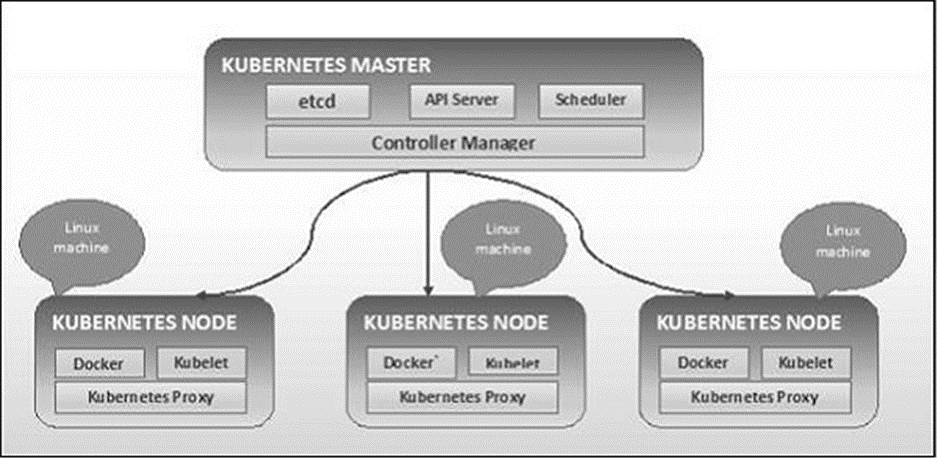

Kubernetes - Master Machine Components

Following are the components of Kubernetes Master Machine.

etcd

It stores the configuration information which can be used by each of the nodes in the cluster. It is a high availability key value store that can be distributed among multiple nodes. It is accessible only by Kubernetes API server as it may have some sensitive information. It is a distributed key value Store which is accessible to all.

API Server

Kubernetes is an API server which provides all the operation on cluster using the API. API server implements an interface, which means different tools and libraries can readily communicate with it. Kubeconfig is a package along with the server side tools that can be used for communication. It exposes Kubernetes API.

Controller Manager

This component is responsible for most of the collectors that regulates the state of cluster and performs a task. In general, it can be considered as a daemon which runs in nonterminating loop and is responsible for collecting and sending information to API server. It works toward getting the shared state of cluster and then make changes to bring the current status of the server to the desired state. The key controllers are replication controller, endpoint controller, namespace controller, and service account controller. The controller manager runs different kind of controllers to handle nodes, endpoints, etc.

Scheduler

This is one of the key components of Kubernetes master. It is a service in master responsible for distributing the workload. It is responsible for tracking utilization of working load on cluster nodes and then placing the workload on which resources are available and accept the workload. In other words, this is the mechanism responsible for allocating pods to available nodes. The scheduler is responsible for workload utilization and allocating pod to new node.

Kubernetes - Node Components

Following are the key components of Node server which are necessary to communicate with Kubernetes master.

Docker

The first requirement of each node is Docker which helps in running the encapsulated application containers in a relatively isolated but lightweight operating environment.

Kubelet Service

This is a small service in each node responsible for relaying information to and from control plane service. It interacts with etcd store to read configuration details and wright values. This communicates with the master component to receive commands and work. The kubelet process then assumes responsibility for maintaining the state of work and the node server. It manages network rules, port forwarding, etc.

Kubernetes Proxy Service

This is a proxy service which runs on each node and helps in making services available to the external host. It helps in forwarding the request to correct containers and is capable of performing primitive load balancing. It makes sure that the networking environment is predictable and accessible and at the same time it is isolated as well. It manages pods on node, volumes, secrets, creating new containers’ health checkup, etc.

Kubernetes - Master and Node Structure


Comments

Popular posts from this blog

Script To Monitor disk Usage

Hello All, Many times we have a requirement to automate few of the tasks, and one of the important task is to delete old log files from log destination. We usually get the conditions where we have to delete the log from particular directory when it reaches to some thresh hold value. Now a day the requirement of automation is highly increased where we are seeing most of the day to day tasks are getting automated using different scripting languages. Its always a good idea to automate your daily tasks which will save your working hours and will increase your productivity. Most of the time log destination gets full and due to which we face other issues like application down or particular service stop working. And manual deleting of log is hectic process so below script will help you to delete your log data when it meets your condition, and also it will trigger mail to recipient after deletion of logs. You can schedule this script in your crontab according to your feasible ti...

Azure Active Directory

  What is Azure Active Directory? Azure Active Directory is Microsoft’s multi-tenant, cloud-based directory and identity management service. For an organization, Azure AD helps employees sign up to multiple services and access them anywhere over the cloud with a single set of login credentials. Azure Active Directory Concept: It is important to understand these Azure AD concepts. Identity . An object that can get authenticated. An identity can be a user with a username and password. Account . An identity that has data associated with it. You can't have an account without an identity. Azure subscription . Used to pay for Azure cloud services. You can have many subscriptions and they're linked to a credit card. Azure tenant/directory . A dedicated and trusted instance of Azure AD, a Tenant is automatically created when your organization signs up for a Microsoft cloud service subscription. More instances of Azure AD can be created. Azure AD is the underlying product ...

Azure Storage

Azure Storage is Microsoft's cloud storage solution for modern data storage scenarios.    Why Azure Storage: Durable and Highly Available: ·        Data is safe during hardware failure. ·        Replicate data across data centres. ·        In local catastrophe or natural disaster data replicated to other data centres remains highly available. Secure: ·        Data encrypted by Azure service Storage Service encryption (SSE) for data at rest. ·        Completed control over who access your data. Scalable: ·        Designed to massive scale. Managed: ·        Azure handles maintenance, updates and critical issues. Accessible: ·        Accessible from anywhere in the world. ·        You can access using http, https,...

Connect SparkThriftServer with Tableau/PowerBI

  Connect SparkThriftServer with Tableau/PowerBI REFERENCE : https://docs.microsoft.com/en-us/azure/hdinsight/hdinsight-apache-spark-use-bi-tools Use Power BI for Spark data visualization Note This section is applicable only for Spark 1.6 on HDInsight 3.4 and Spark 2.0 on HDInsight 3.5.   Once you have saved the data as a table, you can use Power BI to connect to the data and visualize it to create reports, dashboards, etc.   1.       Make sure you have access to Power BI. You can get a free preview subscription of Power BI from http://www.powerbi.com/ . 2.       Sign in to Power BI . 3.       From the bottom of the left pane, click Get Data . 4.       On the Get Data page, under Import or Connect to Data , for Databases , click Get . 5.       On the next screen, click Spark on Azure HDInsight and then click Connect . When prompted, enter th...

Continuous Integration with Jenkins and GitLab

  Enter the credential manager Go into system credentials Add a new credential (private key of slave node where you want to run the job) We need a SSH private key credential. I’m not sure the username matters, but I set it to “git” as that is what the login for gitlab uses. I then pointed it to my *private* key on the machine and gave it a description. Now the key shows up in the system. Once I had setup the ssh private key, which allows Jenkins to connect to the git host over ssh (i.e. git clone git@server:user/repo.git), I needed to setup API Access for Jenkins to get metadata from GitLab. In GitLab go to your user profile. Select “Access Tokens”. Now make a new token, I gave it a descriptive name and made it expire at the end of the decade (I haven’t investigated the pros/cons of expiration date length yet). You are then presented with a screen showing the token. Copy it now, as it won’t be accessible again! You can always create a new one if you mess it up t...